Saved Resumes
Organize your recruitment process by bookmarking candidate resumes that you can access instantly when opportunities arise.
Saved Resumes Overview
What are Saved Resumes?
Saved resumes are candidate profiles that you have bookmarked for future reference, allowing you to build a curated collection of potential hires that you can access instantly when new opportunities arise or when you need to review past candidates.
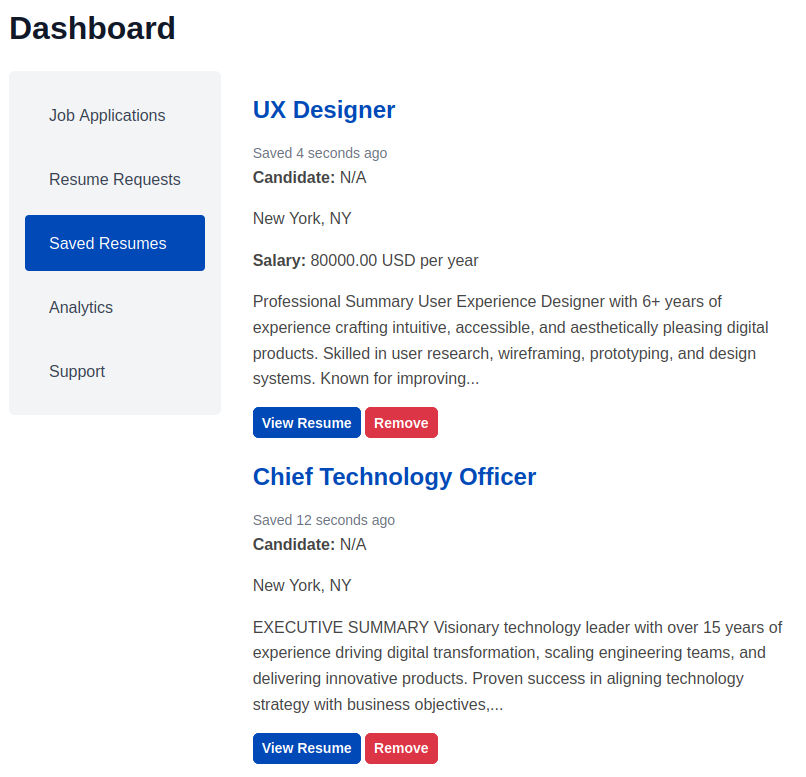
Screenshot: Saved Resumes Dashboard
Saving Resumes Process
How to Bookmark Resumes
From Individual Resume Pages
- Open the candidate's full resume profile
- Review detailed qualifications and experience
- Click on Bookmark Resume ♡ icon
From Job Applications
- Review applicants for your job postings
- Identify strong candidates (both hired and not hired)
- Open the resume link in a new tab
- Click on Bookmark Resume ♡ icon, it becomes red (Resume added to Saved Resumes collection)
How to remove Bookmarks
From Individual Resume Pages
- Open the candidate's full resume profile
- Make sure that the bookmark icon is red (Resume already bookmarked)
- Click on Bookmark Resume ♡ icon, it becomes gray (Resume removed from bookmarks)
From Saved Resumes Dashboard
- Review your saved resumes
- Identify the resumes you want to remove from bookmarks
- Click on "Remove" button
Screenshot: Bookmark Icon on Resume View Page

Workflow Integration and Best Practices
Job Posting and Requirement Definition
Start recruitment with your saved resume collection:
- Search saved resumes before posting new jobs
- Identify potential candidates from existing pipeline
- Adjust job requirements based on available talent
- Pre-populate candidate shortlists from saved resumes
Candidate Sourcing and Outreach
Leverage saved relationships for faster sourcing:
- Prioritize outreach to previously engaged candidates
- Use saved communication history for personalized messages
- Activate passive candidates from long-term pipeline
- Coordinate team outreach to avoid duplicate contacts
Interview and Evaluation Process
Streamline evaluation with historical candidate data:
- Read previous interview notes and feedback
- Review historical performance and assessment scores
- Compare candidates against saved benchmark profiles
- Track candidate progression through multiple opportunities
Decision Making and Offer Process
Make informed decisions with comprehensive candidate insights:
- Review complete candidate relationship history
- Access team feedback and collaborative notes
- Understand candidate preferences and motivations
- Predict acceptance likelihood based on past interactions