Encoded Resume Links
Learn about encoded links, direct access URLs, and how to share your profile securely with potential employers.
What Are Encoded Links?
Encoded links are special URLs that provide secure, direct access to your resume or job postings without requiring login credentials. This feature is available to all candidates free of charge.
How Encoded Links Work
🔒 Security & Privacy
Encoded links use advanced security measures to protect your information:
🎲 Unique Identifiers
Each link contains a randomly generated, unique identifier that cannot be guessed or enumerated by unauthorized users.
🚫 Revocation Control
You can disable or revoke encoded links at any time through your candidate dashboard.
Creating Encoded Links
Step 1: Access Resume Settings
- Log into your JobRadars.com account
- Navigate to My Resumes page
- Click on "Share Resume Link" (🔗) icon next to your resume title
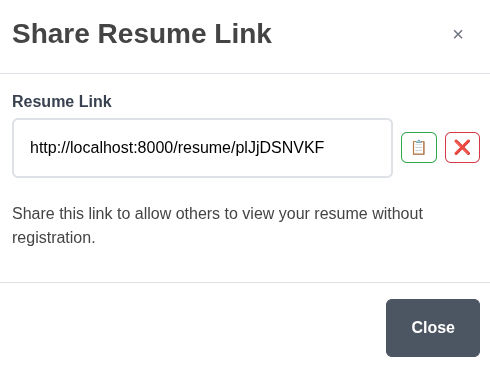
Step 3: Generate & Copy Link
- Click on "Generate" button in the pop-up window
- Copy the generated encoded URL
- Test the link in an incognito/private browser
Screenshot: Encode Link Generation Interface
Using Encoded Links Effectively
🎯 Common Use Cases
📧 Email Applications
Include encoded resume links in job applications:
- Provides instant access without attachments
- Reduces email size and delivery issues
- Always shows most current resume version
Example Email Text:
Dear Hiring Manager,
Please find my resume at: [encoded-link]
This link provides secure access to my complete professional profile and portfolio.
🌐 Social Media Sharing
Share your professional profile on social platforms:
- LinkedIn profile and posts
- Twitter/X professional updates
- Professional networking events
- Industry forum signatures
🤝 Networking Events
Quick sharing at professional events:
- QR codes linking to your resume
- Business card alternatives
- Conference presenter profiles
- Follow-up after meetings
💼 Portfolio Websites
Integrate with personal websites:
- Always up-to-date resume section
- No need to manually sync content
- Professional presentation
- Statistics on visitor engagement
Managing Your Encoded Links
On My Resumes page you can view your current encoded link for each specific resume, revoke the link or generate a new one by clicking on "Share Resume Link" icon.
Troubleshooting Encoded Links
❌ Link Not Working
Common Causes:
- Link has been disabled
- Incorrect URL copying (missing characters)
- Network or browser issues
Solutions:
- Check link on My Resumes page
- Regenerate the link if necessary
- Test link in different browser