Employer Resume Requests
Master the art of managing resume requests and candidate communications.
Understanding Resume Requests
What are Resume Requests?
Resume requests are formal inquiries you send to candidates whose resumes interest you, offering them to contact you back or inviting them to apply for specific positions. This proactive approach helps you reach passive candidates who may not be actively job searching.
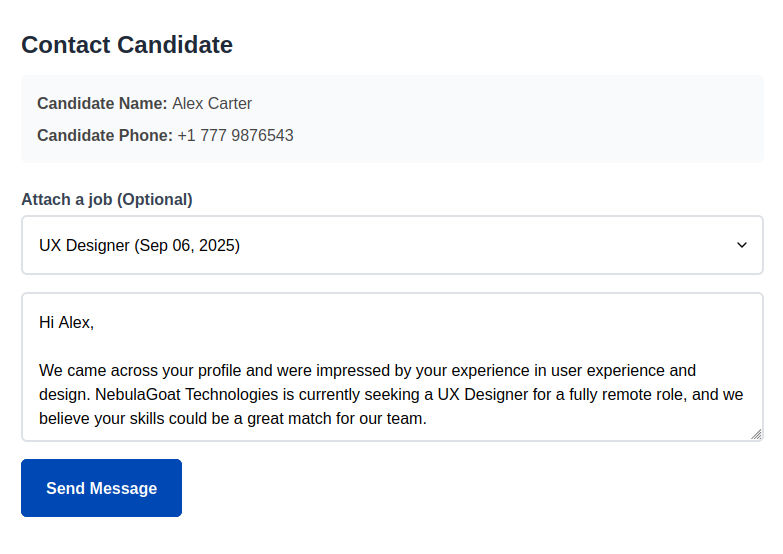
Screenshot: Resume Request Interface
Resume Request Workflow
1. Candidate Discovery
Find interesting candidates through search:
- Search resumes by keywords and location
- Browse resume database by location
- Review resume information
- Identify potential matches
2. Initial Assessment
Evaluate candidate fit based on available information:
- Review skills and experience summary
- Check location and availability
- Assess career progression and goals
- Determine priority level for outreach
3. Request Creation
Craft personalized resume request:
- Decide what's the purpose of your request
- Personalize message content
- Include relevant job details if applicable
- Set follow-up preferences and timeline
4. Response Management
Handle candidate responses and follow-up:
- Track responses
- Manage positive and negative responses
- Schedule follow-up communications
- Move candidates through hiring pipeline
Request Status Management
Request Statuses Explained
- Sent: Request sent, awaiting candidate response.
- Responded: Candidate responded, interested in further communication.
- Hired: Candidate has been hired.
- Rejected: Candidate has been rejected.
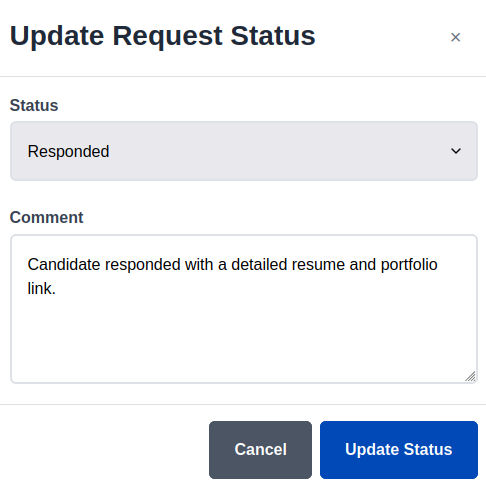
Updating Request Statuses
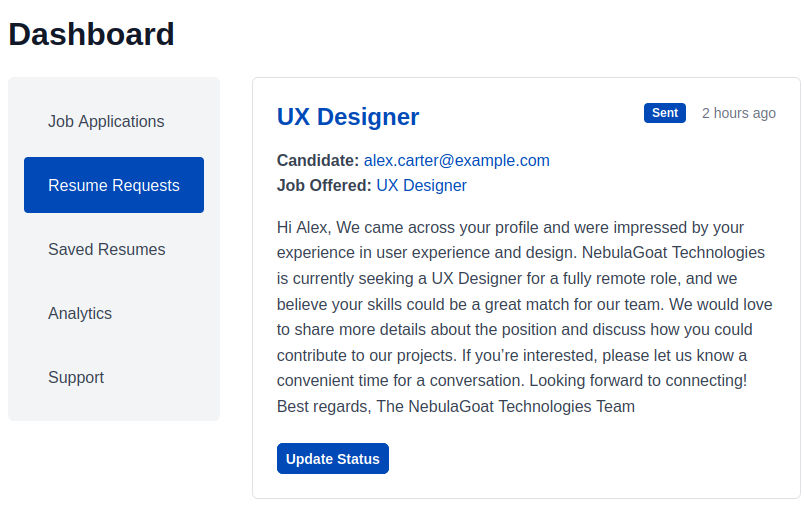
- Click on "Update Status" under the request you want to modify.
- Set new status.
- Add any relevant comments.
Screenshot: Resume Requests Dashboard
Screenshot: Resume Request Status Update