Job Search
Master the art of job searching on JobRadars.com with search features and application strategies.
Getting Started with Job Search
JobRadars.com offers powerful job search tool to help you find the perfect opportunity. Whether you're looking for remote work, specific industries, or jobs in particular locations, our search system has you covered.
Search Access Levels
- Public Search: Browse jobs without registration
- Registered Users: Apply to jobs directly or on employer's website
- All Candidates: Bookmarking jobs, support, and all features are free
Using the Job Search
Basic Search
1. Enter Keywords
Use the search bar on the home page to enter:
- Job titles (e.g., "Software Engineer", "Marketing Manager")
- Skills (e.g., "Python", "Project Management")
- Company names
- Industry terms
2. Select Location
Choose your preferred work location:
- Specific cities or regions
- "Remote" for remote work options
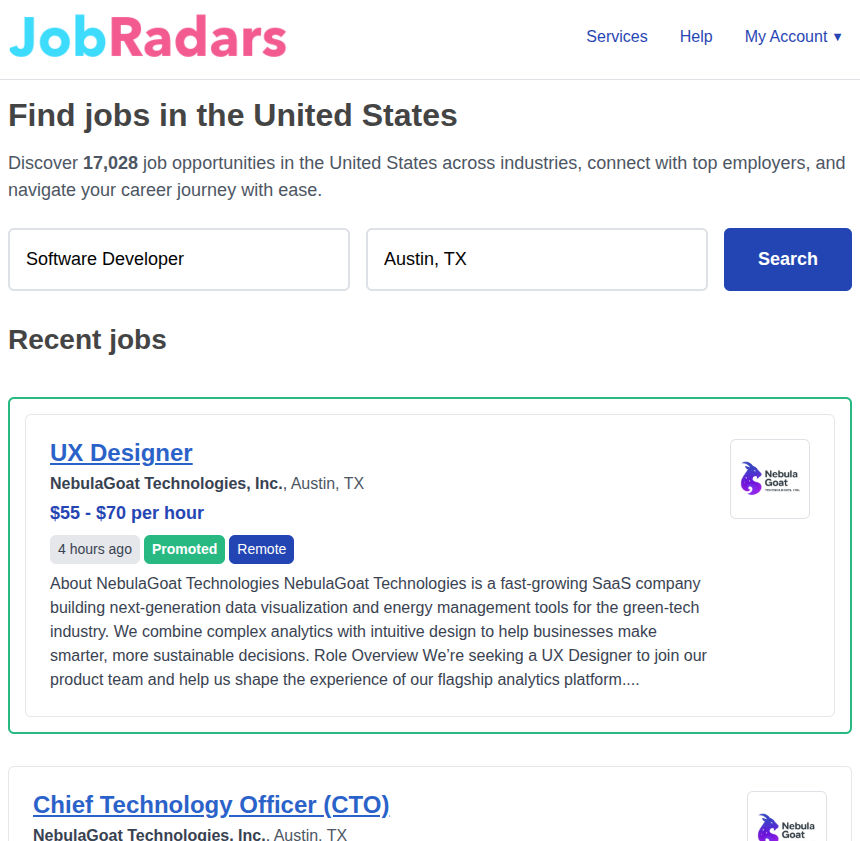
Screenshot: Job Search Interface
Job Results and Listings
Understanding Job Listings
Each job listing shows key information:
📋 Job Title & Company
Position name and hiring organization
📍 Location & Remote Options
Work location or remote work availability
💰 Salary Range
Compensation information (when provided)
📅 Posted Date
When the job was listed
⏰ Job Type
Full-time, part-time, contract, etc.
📄 Description Preview
Key requirements and responsibilities
Additional Search Features
🔖 Bookmarking Jobs
Save interesting jobs for later review:
- Click the bookmark icon on job details page
- Access saved jobs from your dashboard
- Remove bookmarks when no longer interested
🚫 Ad-Free Experience
Focus on your job search without distractions (available with Resume Promotion package):
- Clean, clutter-free interface
- Faster page loading
- Improved mobile experience
- More jobs visible per page
Ad-free browsing is included when you purchase a Resume Promotion package.
Job Application Process
How to Apply
1. Review the Job
Click on job titles to read full descriptions, requirements, and company information.
2. Check Your Fit
Ensure you meet the key requirements and that the role aligns with your career goals.
3. Prepare Your Application
Have an updated resume ready and prepare a tailored cover letter if required.
4. Apply Through JobRadars.com
Click "Apply Now" and follow the application process. Some jobs may redirect to company websites.
5. Track Your Application
All candidates can track application status and set follow-up reminders for free.
Search Tips and Strategies
🎯 Effective Search Techniques
Use Synonyms and Variations
- Try different job titles: "Developer" vs "Engineer" vs "Programmer"
- Use industry-specific and common terms
- Search for skills as well as job titles
Consider Related Opportunities
- Look at adjacent roles that use similar skills
- Consider different seniority levels
- Explore contract or part-time options
Time Your Searches
- Search regularly as new jobs are posted daily
- Mondays often have fresh postings
- Set up alerts for competitive positions
⚠️ Common Search Mistakes to Avoid
- Being too specific too early - you might miss good opportunities
- Only searching for one job title - use variations
- Ignoring location flexibility - remote work is growing
- Applying to everything - quality over quantity works better
Search Troubleshooting
No Results Found
Try broader search terms, check spelling, or expand your location search. Consider related job titles or industries.
Too Many Results
Add more specific keywords or search within a smaller geographic area
Irrelevant Results
Use more specific job titles or adjust your location settings.
Search Not Working
Clear your browser cache, check your internet connection, try disabling browser extensions, or use a different device. Contact support if problems persist.
Old Job Listings
Contact us if you notice consistently outdated listings or external application links lead to expired postings.