Job Management
Master the complete job management lifecycle to maximize your hiring success and efficiently manage all aspects of your job postings.
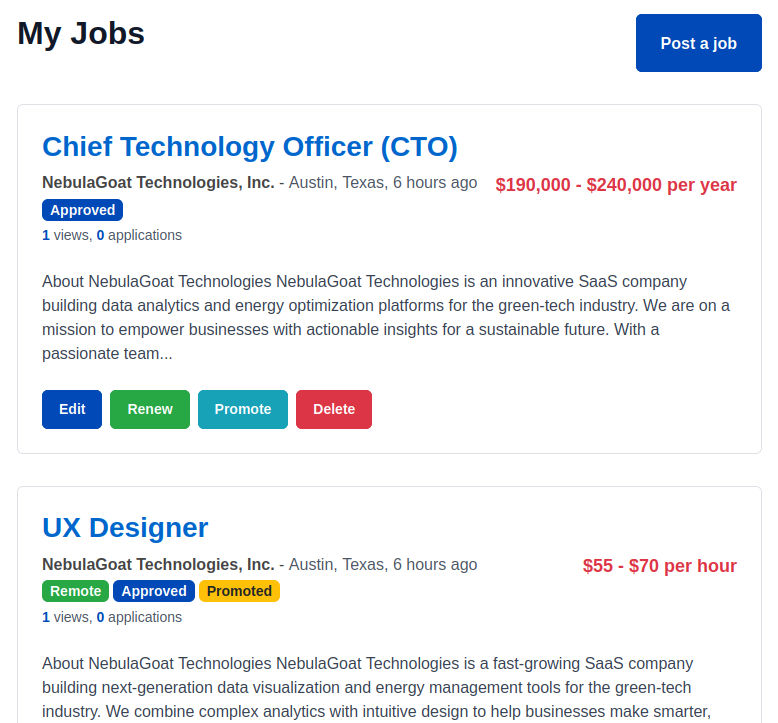
Job Management Dashboard ("My Jobs" page)
Available actions
- Post New Job
- Edit Job
- Promote Job
- Renew Job
- Delete Job
Screenshot: Employer Job Management Page
Understanding the Job Lifecycle
Week 1: Peak Activity
- Highest application volume (40-50% of total)
- Maximum visibility in search results
- Monitor and respond to initial applications
- Adjust job details based on early feedback
Weeks 2-3: Steady Flow
- Consistent application rate (30-40% of total)
- Begin screening and interviewing process
- Consider promoting if applications are low
- Update job if requirements change
Week 4+: Declining Interest
- Reduced application volume (10-20% of total)
- Consider refreshing or renewal
- Finalize hiring decisions
- Plan for potential reposting
Lifecycle Optimization Tips
Maximize Initial Impact
- Post jobs on Tuesday-Thursday for best visibility
- Use featured promotion for first week
- Share on social media and company channels
- Ensure all details are complete and compelling
Maintain Momentum
- Respond to applications within 24-48 hours
- Update job description based on candidate questions
- Consider salary adjustments if applications are low
- Refresh job posting with minor edits
End-of-Cycle Management
- Plan renewal strategy before expiration
- Analyze performance data for improvements
- Document successful hiring outcomes
- Archive job data for future reference
Editing and Updating Jobs
When and Why to Edit Jobs
Low Application Volume
If your job isn't getting enough applications:
- Review and broaden requirements
- Increase salary range or improve benefits
- Enhance job description with more details
- Add remote work options if possible
Too Many Unqualified Applications
If receiving many irrelevant applications:
- Clarify required qualifications
- Add specific skill requirements
- Include screening questions
- Specify experience level more clearly
Role Requirements Change
When business needs evolve:
- Update job responsibilities
- Modify required skills or experience
- Adjust team structure or reporting
- Change location or remote work options
Market Feedback
Based on candidate and market response:
- Adjust salary based on candidate expectations
- Improve benefits package description
- Clarify growth opportunities
- Address common candidate questions
Best Practices for Job Editing
Timing Considerations
- Avoid major edits during peak application times
- Make changes early in the posting lifecycle when possible
- Consider the impact on candidates already in process
- Plan updates around your review schedule
Change Documentation
- Track what changes were made and why
- Note the impact of changes on application volume
- Maintain version history for analysis
- Document successful optimization strategies
Candidate Communication
- Notify existing applicants of significant changes
- Update screening criteria fairly for all candidates
- Clarify new requirements with candidates in process
- Maintain consistency in evaluation standards