Applying for Jobs
Learn how to apply for jobs effectively on JobRadars.com and increase your chances of getting hired.
Application Requirements
Before applying for jobs on JobRadars.com, make sure you have:
- A registered candidate account
- Verified email address
- At least one resume uploaded
- Complete profile information
💡 Pro Tip
Having multiple resumes tailored to different job types can significantly improve your application success rate.
How to Apply for Jobs
Step 1: Find Jobs
Use our job search to find opportunities that match your skills and interests:
- Browse job listings by location or category
- Use search form to narrow down results
Step 2: Review Job Details
Before applying, carefully review the job posting:
- Read the full job description and requirements
- Check salary range and benefits
- Research the company background
- Assess your fit for the role
Step 3: Select Your Resume
Choose the most relevant resume for the position:
- Select a resume that highlights relevant experience
- Ensure your resume is up-to-date
- Consider creating a customized version if needed
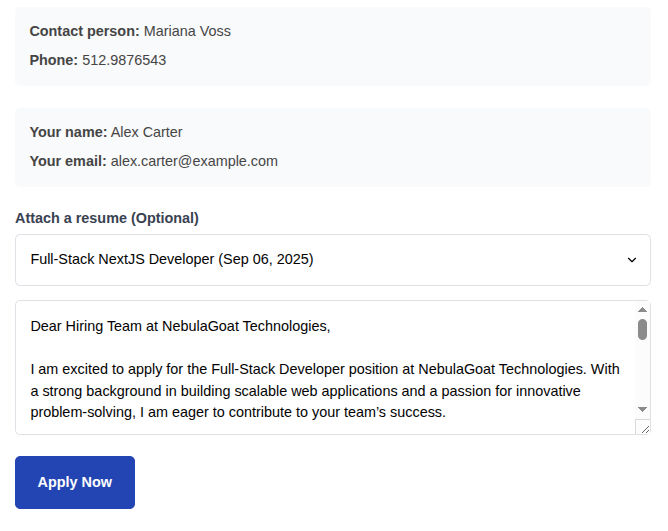
Step 4: Submit Your Application
Complete the application process:
- Click "Apply Now" on the job listing
- Select your resume from the dropdown
- Write a compelling cover letter (Message to Employer)
- Review and submit your application
Screenshot: Job Application Form
Application Types
🔗 Direct Applications
Apply directly through JobRadars.com:
- Your application is sent directly to the employer
- Employer can contact you through the platform
- You can see detailed tracking in your dashboard
🌐 External Applications
Some jobs redirect to company websites (you can notice it by the external link icon on "Apply Now" button):
- Click "Apply Now" to visit the company's application page
- Follow the employer's application process
- You may need to create a separate account on their site
- These applications won't appear in your dashboard unless you specifically click on "Mark as Applied" button on job details page on our platform
Writing Effective Cover Letters
📝 Cover Letter Structure
1. Opening Paragraph
- Mention the specific job title
- State how you found the position
- Express your interest briefly
2. Body Paragraphs
- Highlight relevant experience and skills
- Provide specific examples of achievements
- Show knowledge of the company
- Explain why you're a good fit
3. Closing Paragraph
- Summarize your interest
- Request an interview
- Thank them for their time
- Include professional closing
⚠️ Cover Letter Mistakes to Avoid
- Generic, one-size-fits-all letters
- Repeating everything from your resume
- Focusing on what you want instead of what you offer
- Spelling or grammar errors
- Making it too long (keep it simple)
Application Tips & Best Practices
⏰ Timing Matters
- Apply as soon as possible after job posting appeared on our platform
- Avoid applying late at night or on weekends
🎯 Quality Over Quantity
- Target jobs that match your qualifications
- Customize each application
- Don't apply to every job indiscriminately
🔍 Research First
- Learn about the company culture
- Understand the role requirements
- Check company reviews and reputation
Application Management Features
✅ Applied Jobs Dashboard
Track all your applications in one place:
- See application status updates
- Add personal notes and follow-up reminders
- Track external job applications
💬 Support
Get help when you need it:
- Application troubleshooting
- Resume optimization advice
- Career coaching resources
- Request support for specific jobs
After You Apply
What Happens Next?
- Application Received: Your application is sent to the employer
- Initial Review: Employer reviews your resume and cover letter
- Screening: You may be contacted for a phone or video screening
- Interview: If selected, you'll be invited for an interview
- Decision: Employer makes hiring decision
Common Application Issues
Application Not Submitting
Check your internet connection, ensure all required fields are filled, clear browser cache, or try a different browser.
No Response from Employers
This is common - employers receive many applications. Focus on applying to roles that closely match your qualifications and consider improving your resume or cover letter.
Application Accidentally Submitted
Unfortunately, applications cannot be withdrawn once submitted. Double-check all information before clicking submit.